



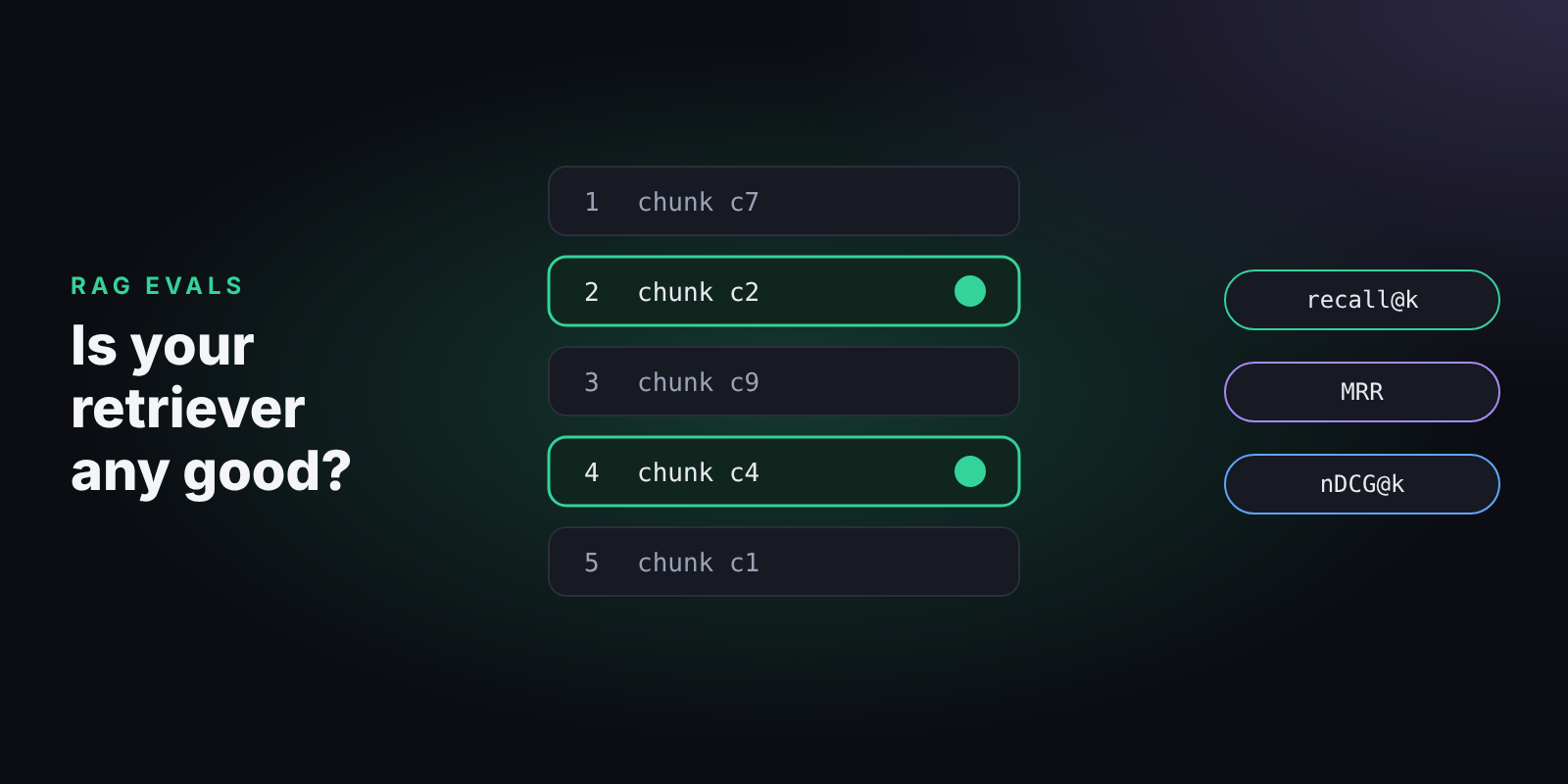
Is Your RAG Retriever Any Good? Measuring It with Recall@k, MRR and nDCG
A RAG app can only answer from what its retriever finds. Learn how to build a small labelled eval set and score your retriever with recall@k, MRR and nDCG, with runnable code for each metric and the mistakes that make the numbers lie.
A RAG app (retrieval-augmented generation) answers a question in two steps. First a retriever searches your documents and returns the few chunks that look most relevant. Then a language model writes an answer using only those chunks. If the chunk with the answer never makes it into that short list, the model cannot use it, however good the model is. It will guess, or say it doesn't know.
So when a RAG app gives bad answers, the first question is: did the retriever find the right text? You can answer that with numbers, without calling a language model at all, using three metrics borrowed from search engines: recall@k, MRR and nDCG. They are also a common follow-up in AI engineering interviews ("How would you evaluate the retrieval step?"), and the answer interviewers want is exactly what this post covers.
What you need before any metric
Short answer: A list of real questions, and for each one, the IDs of the chunks that actually answer it. Everything else is arithmetic.
This labelled list is your eval set. Search people call the labels qrels (query relevance judgments). An entry looks like this:
query:     "How do I rotate an API key?"
relevant:  k12 (answers it), k13 (related)
Some practical advice for building one:
- Use real questions. Pull them from search logs, support tickets or chat history. Questions you invent yourself tend to reuse the exact words in the docs, which makes keyword search look better than it will be in production.
- 50 to 200 queries is enough to start. That's a few hours of labelling, and enough to tell a large improvement from noise. With 10 queries, a single query flipping changes your average by 10 points.
- Label by meaning, not by chunk. If you change your chunk size, chunk IDs change and your labels break. It's safer to store the source document and the passage (for example a heading or character range), then map them to whatever chunks the current pipeline produces.
- Generated questions are a supplement, not a replacement. Asking an LLM to write a question for each chunk is a quick way to get coverage, but those questions are worded like the chunk they came from. Keep a set of real questions as the one you trust.
Then the loop is simple: run every query through the retriever, take the top k results, compare them with the labels, and average a metric over all queries.
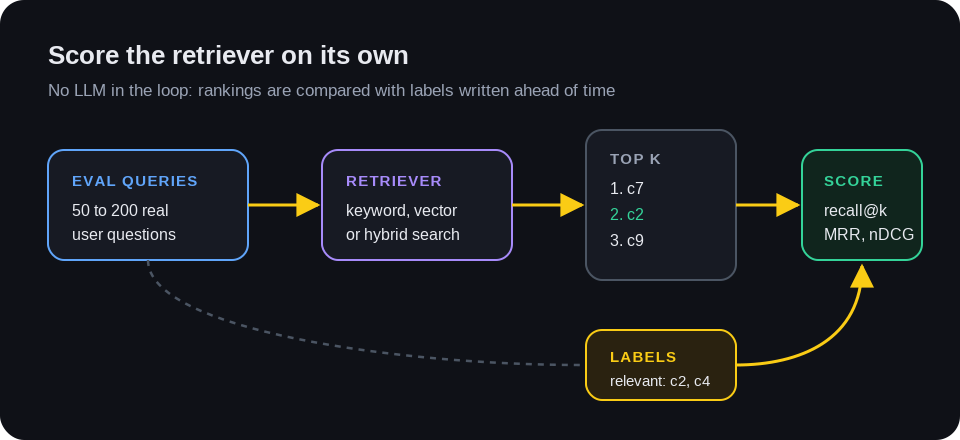 Evaluate the retriever on its own: run labelled queries through it and compare the top k results with the labels
Recall@k: did we find it at all?
Short answer: Of all the chunks that are relevant to a query, the share that appear in the top k results. For RAG this is usually the metric that matters most, because the model sees the top k and nothing else.
Set k to the number of chunks you actually put into the prompt. If your app passes 5 chunks to the model, recall@5 tells you how often the needed text was in front of it.
Precision@k is the other half: of the k chunks returned, the share that are relevant. In classic search a page of junk results annoys the user, so precision matters a lot. In RAG it matters less: a model can usually ignore a few unhelpful chunks, but it cannot invent a missing one. Low precision still costs you tokens and can distract the model, so keep an eye on it, but optimise recall first.
Output:
k=1  recall=0.00  precision=0.00
k=3  recall=0.33  precision=0.33
k=5  recall=0.67  precision=0.40
Recall grows as k grows, because you're allowed to look further down the list. Chunk c5 was never retrieved, so recall stays below 1 no matter how large k gets until the retriever finds it.
A simpler variant you'll see in RAG tools is hit rate@k (also called success@k): 1 if at least one relevant chunk is in the top k, else 0. It fits questions where one chunk is enough to answer. Use full recall when the answer needs several chunks together, such as a comparison across two documents.
MRR: how high is the first good result?
Short answer: For each query, take 1 divided by the position of the first relevant result (0 if there is none), then average over all queries. It rewards putting a good chunk at the very top.
That per-query number is the reciprocal rank (RR). First place scores 1, second scores 0.5, third 0.33, and so on. The average across queries is the mean reciprocal rank (MRR).
Output:
reset 2FA      RR=1.000
refund window  RR=0.500
export to CSV  RR=0.333
delete account RR=0.000
MRR=0.458
MRR only looks at the first relevant result. That makes it a good fit when one chunk answers the question, and a poor one when the answer is spread over several chunks: a query that finds one of three needed chunks at rank 1 gets a perfect 1.0. Read MRR next to recall, not instead of it.
Why care about order at all, if the model sees all k chunks anyway? Two reasons. If you later shrink k to save tokens, a retriever that ranks well loses less. And language models don't always use every part of a long context equally well: "Lost in the Middle" (Liu et al., 2023) found models used information at the start or end of their context better than information in the middle. Keeping the best chunk near the top is the safer choice.
nDCG: order and "how relevant"
Short answer: nDCG gives each relevant result points for how relevant it is, shrinks those points the lower it appears, and divides by the score of the best possible ordering. 1.0 means perfect order; 0 means nothing relevant was found.
So far relevance has been yes or no. Real labels are often graded: one chunk answers the question, another is merely related. nDCG (normalised discounted cumulative gain) uses those grades. It was introduced by Järvelin and Kekäläinen in "Cumulated gain-based evaluation of IR techniques" (ACM Transactions on Information Systems, 2002) and is one of the standard metrics retrieval benchmarks report: BEIR, for example, reports nDCG@k alongside recall@k, MAP and precision@k.
It's built in three steps:
- Gain: each result earns its relevance grade, say 2 for "answers it", 1 for "related", 0 otherwise.
- Discounted cumulative gain (DCG): divide each gain by
log2(rank + 1)and add them up. Rank 1 is divided by 1, rank 2 by 1.58, rank 3 by 2, so a relevant chunk is worth less the lower it sits. - Normalise: compute the DCG of the ideal ranking (all relevant chunks, best grades first) and divide by it. That puts every query on the same 0 to 1 scale, whether it has one relevant chunk or ten.
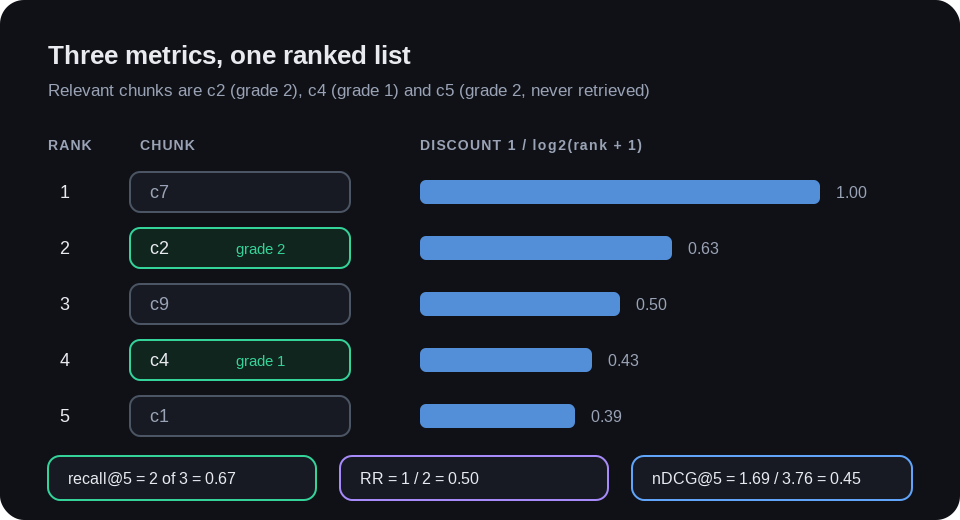 One ranked list scored three ways: recall counts what was found, RR looks at the first hit, and nDCG weighs every hit by grade and position
In the picture, the ideal ranking would be c2, c5, c4 with a DCG of 2/1 + 2/1.58 + 1/2 = 3.76. The retriever's list earns 2/1.58 + 1/2.32 = 1.69, so nDCG@5 = 0.45. It found two of the three chunks but put the best one second and missed the other completely.
Here the same three chunks are ranked two ways. Recall@5 is identical (both lists contain c2, c4 and c5), but nDCG shows that the first ordering is much better:
Output:
A: DCG@5=3.405  nDCG@5=0.905
B: DCG@5=2.266  nDCG@5=0.602
I checked these numbers against scikit-learn's ndcg_score (version 1.9.1), which uses the same gain and log2 discount, and it gives the same 0.905 and 0.602. Be aware that some implementations use 2^grade − 1 as the gain instead of the grade itself. With yes/no labels the two agree; with graded labels they don't, so only compare nDCG numbers produced by the same code.
Note (i + 2) in the code: i is the 0-based array index, so rank = i + 1 and the discount is log2(rank + 1).
Putting it together: comparing two retrievers
The real use of these metrics is deciding between two setups: chunk size A or B, keyword search or vector search, with or without a reranker. Run both on the same eval set and compare the averages. Here's a full comparison on five labelled queries, a keyword retriever against a hybrid one (keyword plus vector search, results merged):
Output:
retriever  recall@5  MRR    nDCG@5
keyword    0.800     0.700  0.649
hybrid     1.000     0.900  0.888
Read the three numbers together. Recall says the hybrid retriever found everything; keyword search completely missed the "SSO" question, which is typical when the user's words ("SSO") differ from the document's ("single sign-on"). MRR and nDCG say hybrid also ranks better. Then look at the failing queries one by one: the averages tell you which setup is better, the individual misses tell you why.
The rankings here are hard-coded so the example runs anywhere. In a real project, replace each list with what your retriever returns for that query, and keep the scoring code exactly as it is.
Mistakes that make the numbers lie
Unlabelled chunks count as wrong. Every metric above treats a chunk without a label as irrelevant. If your retriever finds a good chunk nobody labelled, it gets punished for it. When you look at failures, check whether the "wrong" chunks are actually fine, and add labels when they are. This is the most common reason a new retriever looks worse than it is.
Near-duplicate chunks inflate scores. If the same paragraph appears in three documents (a footer, a copied FAQ), the retriever can fill the top k with copies of one answer. Recall can look fine while the model gets no new information. Deduplicate before indexing, or count duplicates of one passage as one.
Changing chunking silently breaks the labels. Labels tied to chunk IDs become meaningless when chunk boundaries move. Label passages in source documents and map them to chunks, as described at the start.
Averages hide small eval sets. On 20 queries, one query changing from a miss to a hit moves recall@5 by 5 points. Before you trust a 2-point improvement, check how many queries actually changed. With a small set, prefer big, consistent wins.
Benchmark scores are not your scores. Public leaderboards are useful for shortlisting embedding models, but your documents, vocabulary and questions are different. The BEIR benchmark was built specifically to test retrievers "zero-shot", on domains they weren't trained on, because results on one kind of data don't reliably carry over to another. A model that scores well on a leaderboard average can still lose on your data. Run your own eval set before switching.
Retrieval metrics don't measure the answer. A perfect recall@5 means the model had the right text, not that it used it well. Measure the generation step separately (is the answer correct, and does it stay faithful to the retrieved text?). When answers are bad, these retrieval numbers tell you which half of the pipeline to fix.
How to answer this in an interview
If you're asked "How would you evaluate the retrieval part of a RAG system?", a strong answer covers four points in order:
- Evaluate retrieval separately from generation, so you know which step is failing.
- Build a labelled eval set from real user questions, with the relevant passages marked, and keep it fixed so results are comparable over time.
- Pick metrics that match how the app works: recall@k with k equal to the number of chunks you put in the prompt as the main number, MRR when one chunk is enough to answer, nDCG when you have graded labels and order matters.
- Compare setups on the same set and read the failures, watching for unlabelled-but-relevant chunks and duplicates before trusting a difference.
Likely follow-ups: "Why not just use precision?" (in RAG a missing chunk hurts more than an extra one), "What k would you pick?" (the number of chunks you actually send to the model), and "How do you get labels cheaply?" (start from real queries, use LLM-generated questions only to add coverage, and review a sample by hand).
Cheat sheet
| Metric | Question it answers | Range | Use it when |
|---|---|---|---|
| Recall@k | What share of the relevant chunks are in the top k? | 0 to 1 | Always; set k to the number of chunks in the prompt |
| Hit rate@k | Is at least one relevant chunk in the top k? | 0 or 1 per query | One chunk is enough to answer |
| Precision@k | What share of the top k is relevant? | 0 to 1 | You pay for or are distracted by extra chunks |
| MRR | How high is the first relevant chunk? | 0 to 1 | One good chunk answers the question |
| nDCG@k | How good is the order, using graded labels? | 0 to 1 | Several chunks matter, some more than others |
The short version: label real questions, measure recall@k first, use MRR and nDCG to judge ranking, and read the misses before you trust the averages.
Enjoyed this read?
More from Arvind Nishad
- Postgres Composite Indexes: Column Order, Covering Indexes and Skip Scan, Measured on 5 Million Rows
- Cumulative Layout Shift (CLS), Measured: 15 Test Pages That Show What Moves the Score
- Vector Search for RAG: Exact, HNSW and IVF Measured on a Million Vectors
- TypeScript Interview Follow-Up Questions, Answered With TypeScript 7
Related stories
From REST to typed APIs: what changed for our team
From REST to typed APIs: what changed for our team — lessons learned the hard way, distilled into something you can use today.
Performance budgets that actually stick
Performance budgets that actually stick — lessons learned the hard way, distilled into something you can use today.
How the event loop really schedules your code
How the event loop really schedules your code — lessons learned the hard way, distilled into something you can use today.
Responses (0)
Sign in to join the discussion.