



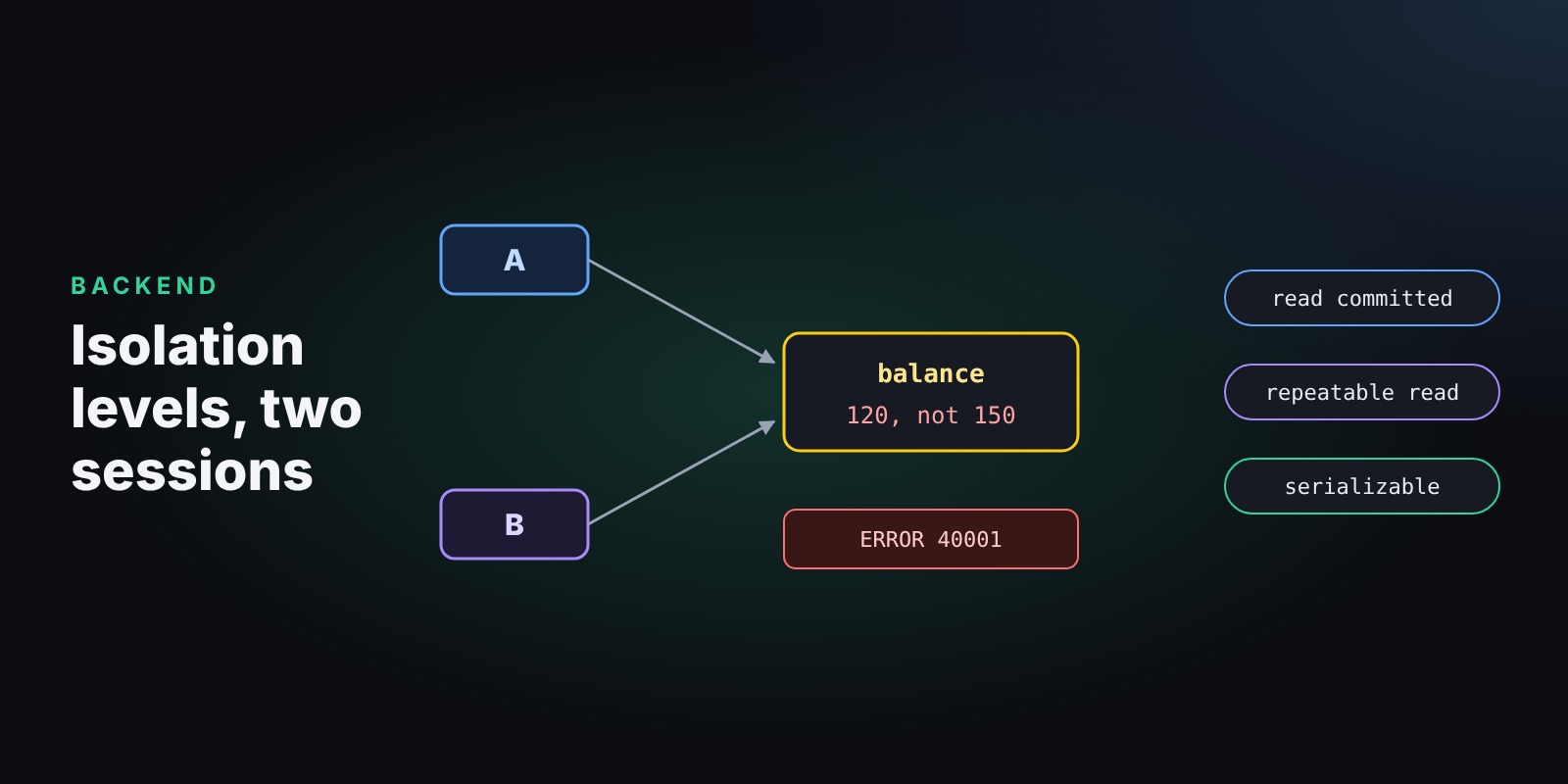
Transaction Isolation Levels, Shown With Two Real PostgreSQL Sessions
What Read Committed, Repeatable Read and Serializable actually protect you from, demonstrated with two concurrent PostgreSQL sessions. Covers lost updates, write skew, the 40001 error and how to retry it.
Most bugs caused by isolation levels never show up in development. You click through the app alone and every transaction runs by itself. In production, two requests touch the same rows a few milliseconds apart. A balance ends up 20 short, or a rule like "at least one doctor must be on call" is quietly broken. No error, no stack trace, just wrong data.
Isolation is the "I" in ACID. It decides what one transaction can see of another transaction that is running at the same time. A transaction is a group of statements that succeed or fail together (BEGIN … COMMIT). The SQL standard defines four isolation levels. Each one rules out a few named anomalies: strange results that could never happen if the transactions ran one after the other.
Explanations of this topic are usually tables of definitions. This post runs the anomalies instead. Every example below is two real sessions, A and B, against PostgreSQL 16.15, driven step by step by a small Node.js script using the pg driver. The output is exactly what each session saw. Behaviour is the same in the current PostgreSQL 18 documentation, which is quoted throughout.
The levels in one table
Short answer: PostgreSQL defaults to Read Committed. Each statement sees data committed before that statement started. Repeatable Read gives the whole transaction one snapshot. Serializable also detects the remaining anomalies and aborts one transaction with error 40001.
This is Table 13.1 from the PostgreSQL documentation on transaction isolation, as printed:
| Isolation level | Dirty read | Nonrepeatable read | Phantom read | Serialization anomaly |
|---|---|---|---|---|
| Read uncommitted | Allowed, but not in PG | Possible | Possible | Possible |
| Read committed | Not possible | Possible | Possible | Possible |
| Repeatable read | Not possible | Not possible | Allowed, but not in PG | Possible |
| Serializable | Not possible | Not possible | Not possible | Not possible |
Two cells say "Allowed, but not in PG". The SQL standard permits the anomaly at that level, but PostgreSQL is stricter. "Read Committed is the default isolation level in PostgreSQL", and it is what you get from almost every ORM unless you ask for something else.
PostgreSQL implements this with MVCC (multi-version concurrency control). An update writes a new version of the row instead of overwriting it in place, so readers keep seeing an older version without waiting for writers. A snapshot is the set of row versions a statement or transaction is allowed to see. The levels differ mainly in when the snapshot is taken.
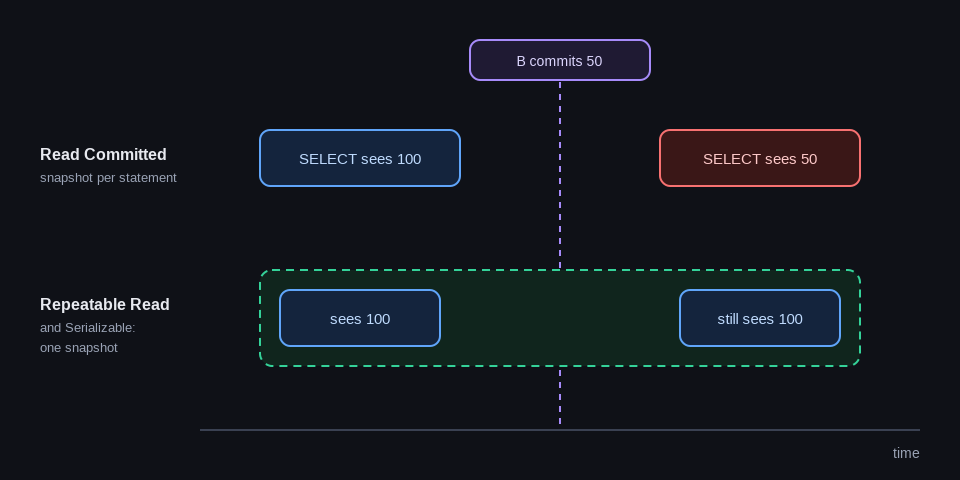 Under Read Committed each statement takes a fresh snapshot, so a second read can see a commit that happened in between; under Repeatable Read and Serializable the whole transaction keeps the snapshot taken by its first statement.
Dirty reads: never in PostgreSQL
Short answer: a dirty read is seeing another transaction's uncommitted change. PostgreSQL never allows it, even if you ask for Read Uncommitted.
Session B changes a balance to 0 but has not committed. Session A, at Read Uncommitted, reads the row. B then rolls back:
-- B
BEGIN;
UPDATE accounts SET balance = 0 WHERE id = 1;
-- A
BEGIN ISOLATION LEVEL READ UNCOMMITTED;
SELECT balance FROM accounts WHERE id = 1;
-- B
ROLLBACK;
What each session saw:
B: BEGIN                                          -> BEGIN
B: UPDATE accounts SET balance = 0 WHERE id = 1   -> UPDATE
A: BEGIN ISOLATION LEVEL READ UNCOMMITTED         -> BEGIN
A: SELECT balance FROM accounts WHERE id = 1      -> 100
B: ROLLBACK                                       -> ROLLBACK
A saw 100, the committed value, not B's 0. The docs say it directly: "PostgreSQL's Read Uncommitted mode behaves like Read Committed." Because of MVCC, uncommitted row versions are simply not visible to anyone else.
Nonrepeatable reads: Read Committed vs Repeatable Read
Short answer: under Read Committed, reading the same row twice in one transaction can return two different values. Repeatable Read pins the snapshot, so it cannot.
A reads a balance, B updates and commits (a single statement commits on its own), then A reads again:
--- READ COMMITTED
A: BEGIN ISOLATION LEVEL READ COMMITTED           -> BEGIN
A: SELECT balance FROM accounts WHERE id = 1      -> 100
B: UPDATE accounts SET balance = 50 WHERE id = 1  -> UPDATE
A: SELECT balance FROM accounts WHERE id = 1      -> 50

--- REPEATABLE READ
A: BEGIN ISOLATION LEVEL REPEATABLE READ          -> BEGIN
A: SELECT balance FROM accounts WHERE id = 1      -> 100
B: UPDATE accounts SET balance = 50 WHERE id = 1  -> UPDATE
A: SELECT balance FROM accounts WHERE id = 1      -> 100
Under Read Committed each statement gets a fresh snapshot, so A's second read sees B's commit. Under Repeatable Read the snapshot is taken at A's first query and kept until A ends, so A sees 100 both times. This matters for anything that reads data in several steps and expects the pieces to agree: a report, an export, or a check followed by a calculation.
Phantom reads: also stopped by Repeatable Read in PostgreSQL
Short answer: a phantom is a new row that appears when you repeat a query with a
WHEREcondition. The standard allows phantoms at Repeatable Read; PostgreSQL does not.
--- READ COMMITTED
A: SELECT count(*) FROM orders WHERE amount > 5   -> 2
B: INSERT INTO orders(amount) VALUES (30)         -> INSERT
A: SELECT count(*) FROM orders WHERE amount > 5   -> 3

--- REPEATABLE READ
A: SELECT count(*) FROM orders WHERE amount > 5   -> 2
B: INSERT INTO orders(amount) VALUES (30)         -> INSERT
A: SELECT count(*) FROM orders WHERE amount > 5   -> 2
The snapshot covers rows that did not exist yet, so B's insert stays invisible to A. This is one of the "Allowed, but not in PG" cells. It is also a classic interview trap, because other engines differ. In SQL Server, for example, Repeatable Read lets other transactions insert matching rows, and re-running the statement "retrieves the new rows, which results in phantom reads" (SQL Server docs). Check the engine before you rely on it.
The lost update: the bug you probably have
Short answer: two transactions read the same value, both compute a new value from it, and the second write silently overwrites the first. Read Committed allows it. Fix it with an atomic
UPDATE … SET x = x + …, withSELECT … FOR UPDATE, or by running at Repeatable Read and retrying.
This is the anomaly that actually loses money. Two requests each deposit into an account with a balance of 100. Each reads the balance in application code, adds its amount, and writes the result back. Here is the same pattern in plain JavaScript, with no database involved. Press Run:
Output:
A: read 100, wrote 130
B: read 100, wrote 120
read-modify-write result: 120 (expected 150)
A: added 30, balance now 130
B: added 20, balance now 150
atomic update result: 150
And here is the same race against PostgreSQL. A adds 30 and B adds 20, each to the 100 it read:
--- READ COMMITTED (the default)
A: BEGIN ISOLATION LEVEL READ COMMITTED            -> BEGIN
B: BEGIN ISOLATION LEVEL READ COMMITTED            -> BEGIN
A: SELECT balance FROM accounts WHERE id = 1       -> 100
B: SELECT balance FROM accounts WHERE id = 1       -> 100
A: UPDATE accounts SET balance = 130 WHERE id = 1  -> UPDATE
A: COMMIT                                          -> COMMIT
B: UPDATE accounts SET balance = 120 WHERE id = 1  -> UPDATE
B: COMMIT                                          -> COMMIT
check: SELECT balance FROM accounts WHERE id = 1   -> 120
The final balance is 120. A's deposit of 30 vanished, and both transactions committed without any error. Read Committed is working exactly as documented: it only promises you will not see uncommitted data.
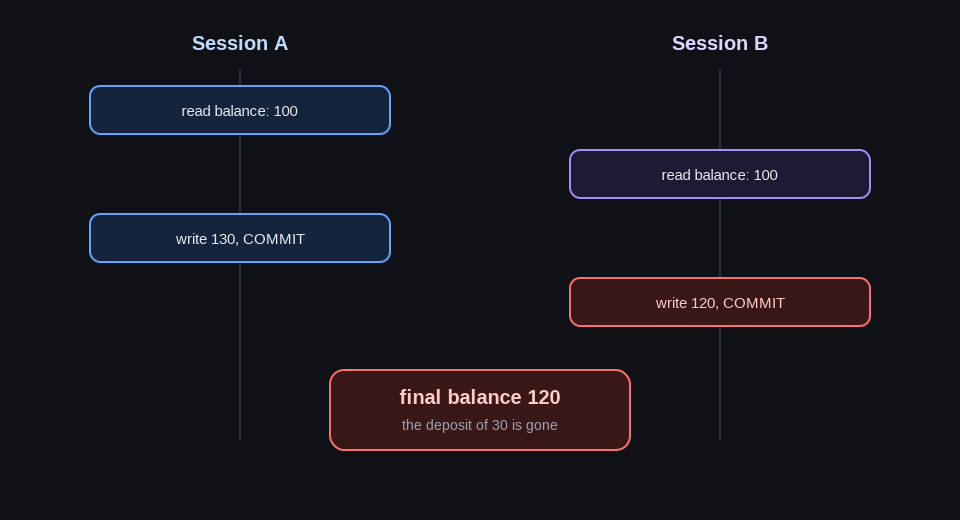 Two transactions both read a balance of 100; A writes 130 and commits, then B writes 120 based on its stale read, so the final balance is 120 and A deposit is lost.
There are three fixes. Each was run against the same table.
Fix 1: let the database do the arithmetic. An atomic update reads and writes the row in one statement. The second writer waits for the first to commit, then applies its change to the new value:
A: BEGIN                                                    -> BEGIN
B: BEGIN                                                    -> BEGIN
A: UPDATE accounts SET balance = balance + 30 WHERE id = 1  -> UPDATE
   (B is blocked, waiting for A)
A: COMMIT                                                   -> COMMIT
B: UPDATE accounts SET balance = balance + 20 WHERE id = 1  -> UPDATE
B: COMMIT                                                   -> COMMIT
check: SELECT balance FROM accounts WHERE id = 1            -> 150
Fix 2: lock the row when you read it. When the new value needs logic that cannot be written in SQL, read with FOR UPDATE. That takes a row lock, so the second reader waits and then sees the committed result:
A: SELECT balance FROM accounts WHERE id = 1 FOR UPDATE  -> 100
   (B is blocked, waiting for A)
A: UPDATE accounts SET balance = 130 WHERE id = 1        -> UPDATE
A: COMMIT                                                -> COMMIT
B: SELECT balance FROM accounts WHERE id = 1 FOR UPDATE  -> 130
B: UPDATE accounts SET balance = 150 WHERE id = 1        -> UPDATE
B: COMMIT                                                -> COMMIT
check: SELECT balance FROM accounts WHERE id = 1         -> 150
Fix 3: raise the isolation level and retry. At Repeatable Read, PostgreSQL refuses to let B overwrite a row that changed after B's snapshot was taken:
--- REPEATABLE READ
A: SELECT balance FROM accounts WHERE id = 1       -> 100
B: SELECT balance FROM accounts WHERE id = 1       -> 100
A: UPDATE accounts SET balance = 130 WHERE id = 1  -> UPDATE
A: COMMIT                                          -> COMMIT
B: UPDATE accounts SET balance = 120 WHERE id = 1  -> ERROR 40001: could not serialize access due to concurrent update
B: COMMIT                                          -> ROLLBACK
check: SELECT balance FROM accounts WHERE id = 1   -> 130
B gets an error instead of corrupting data, and COMMIT turns into ROLLBACK. The balance is 130 and correct so far. B now has to start again from the beginning, read 130, and write 150. That retry is your code's job (see the last section).
Which fix to choose: use atomic updates when the change fits in one statement. Use FOR UPDATE when you need a read-then-decide on a few known rows. Use a higher isolation level with retries when the logic spans many rows or queries and you cannot easily say which rows to lock.
Write skew: the anomaly Repeatable Read lets through
Short answer: two transactions read overlapping data, each checks a rule, then each updates a different row. Both commits are fine on their own, but together they break the rule. Only Serializable stops it.
The textbook example is hospital on-call. The rule is that at least one doctor must stay on call. Alice and Bob are both on call and both ask to go off at the same moment. Each transaction checks "are at least two on call?" and, if so, takes its own doctor off:
--- REPEATABLE READ
A: SELECT count(*) FROM doctors WHERE on_call               -> 2
B: SELECT count(*) FROM doctors WHERE on_call               -> 2
A: UPDATE doctors SET on_call = false WHERE name = 'alice'  -> UPDATE
B: UPDATE doctors SET on_call = false WHERE name = 'bob'    -> UPDATE
A: COMMIT                                                   -> COMMIT
B: COMMIT                                                   -> COMMIT
check: SELECT count(*) FROM doctors WHERE on_call           -> 0
Nobody is on call. Repeatable Read did not complain, because the two transactions never wrote the same row: there was no conflict for it to detect. This is the "serialization anomaly" column of the table. No order of running these two transactions one at a time could end with zero doctors, yet running them concurrently did.
The same steps at Serializable:
--- SERIALIZABLE
A: SELECT count(*) FROM doctors WHERE on_call               -> 2
B: SELECT count(*) FROM doctors WHERE on_call               -> 2
A: UPDATE doctors SET on_call = false WHERE name = 'alice'  -> UPDATE
B: UPDATE doctors SET on_call = false WHERE name = 'bob'    -> UPDATE
A: COMMIT                                                   -> COMMIT
B: COMMIT                                                   -> ERROR 40001: could not serialize access due to read/write dependencies among transactions
check: SELECT count(*) FROM doctors WHERE on_call           -> 1
The error also carried DETAIL: Reason code: Canceled on identification as a pivot, during commit attempt. and HINT: The transaction might succeed if retried.
How does PostgreSQL know? Its Serializable level "is implemented using a technique known in academic database literature as Serializable Snapshot Isolation". It runs on the same snapshots as Repeatable Read, and it also tracks what each transaction read using predicate locks. These are not locks that block anyone. They are bookkeeping that lets PostgreSQL "determine when a write would have had an impact on the result of a previous read from a concurrent transaction". Here A's update changed rows that B's count(*) had read, and B's update did the same to A. When that kind of dependency forms a cycle that could produce a non-serial result, one transaction is cancelled.
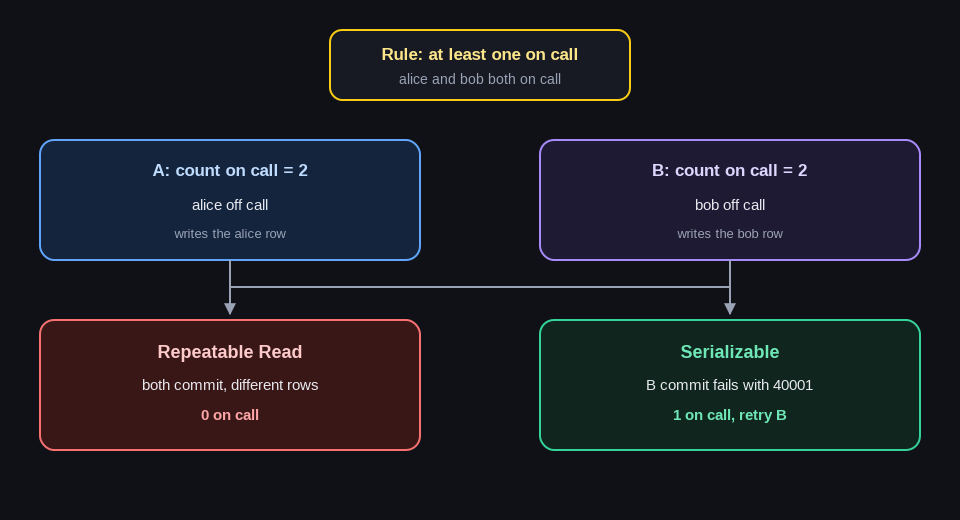 Write skew: both transactions read two doctors on call, each takes a different doctor off call, and under Repeatable Read both commit leaving zero on call; under Serializable the database spots the read and write dependency and aborts one of them.
Other ways to prevent write skew: lock the rows you read with SELECT … FOR UPDATE (here, both doctor rows), or turn the rule into a constraint the database enforces. Serializable has the advantage that you do not need to spot every such rule in advance.
Retrying 40001: required, not optional
Short answer: at Repeatable Read and Serializable, a serialization failure (SQLSTATE
40001) is normal and expected. Catch it, roll back, and rerun the whole transaction, including its reads.
The docs are explicit: "Applications using this level must be prepared to retry transactions due to serialization failures". They also say to "retry the whole transaction from the beginning". Retrying only the failed statement is wrong, because the decision was based on reads that are now out of date.
Here is a retry wrapper with the on-call logic from above, run against the same database. Both transactions read before either writes, so the first attempt really is concurrent:
const { Client } = require('pg');

// Retry the whole transaction when PostgreSQL reports a serialization failure (40001).
async function withSerializableRetry(client, work, maxAttempts = 5) {
  for (let attempt = 1; ; attempt++) {
    try {
      await client.query('BEGIN ISOLATION LEVEL SERIALIZABLE');
      const result = await work(client);
      await client.query('COMMIT');
      return result;
    } catch (err) {
      await client.query('ROLLBACK');
      if (err.code !== '40001' || attempt === maxAttempts) throw err;
      console.log(`  attempt ${attempt} failed with 40001, retrying`);
    }
  }
}

// Go off call only if someone else is still on call.
async function goOffCall(client, name, pause) {
  const { rows } = await client.query('SELECT count(*)::int AS n FROM doctors WHERE on_call');
  await pause();
  if (rows[0].n < 2) return `${name} stays on call (only ${rows[0].n} on call)`;
  await client.query('UPDATE doctors SET on_call = false WHERE name = $1', [name]);
  return `${name} went off call`;
}
Two runs of the full script printed:
  attempt 1 failed with 40001, retrying
alice stays on call (only 1 on call)
bob went off call
on call now: alice

  attempt 1 failed with 40001, retrying
alice went off call
bob stays on call (only 1 on call)
on call now: bob
Which doctor gets the retry depends on timing. Either way, the retry re-reads the count, sees 1, and keeps that doctor on call. The rule holds.
A few practical rules for retries:
- Keep transactions short and free of slow external calls (HTTP requests, emails) between
BEGINandCOMMIT. A side effect inside a transaction that gets retried happens twice. - Cap the attempts and add a little random backoff, so two hot transactions do not keep colliding.
- Retry only
40001(and deadlocks,40P01, if you want). Any other error is a real bug. - Use the level per transaction, not for the whole app:
BEGIN ISOLATION LEVEL SERIALIZABLEfor the money-moving path, the default elsewhere.
Interview follow-ups
"What is the default isolation level?" It depends on the database, so say which one you mean. It is Read Committed in PostgreSQL and in SQL Server ("This option is the SQL Server default"), but "The default isolation level for InnoDB is REPEATABLE READ" in MySQL (MySQL 8.4 docs).
"Does Repeatable Read prevent lost updates?" In PostgreSQL, yes, but by failing the second writer with 40001, not by merging. You still need retry code.
"Why not use Serializable everywhere?" It is correct and often fast enough. But more transactions fail and must be retried under contention, and every caller needs retry logic. Many teams use it for the few paths that enforce cross-row rules and use atomic updates or row locks elsewhere.
"What is the difference between write skew and a lost update?" A lost update is two writes to the same row, where one overwrites the other. Write skew is writes to different rows, each based on a read that the other write made stale.
Cheat sheet
| Situation | Read Committed (default) | Repeatable Read | Serializable |
|---|---|---|---|
| See uncommitted data | No | No | No |
| Same row read twice gives different values | Yes | No | No |
| New rows appear in a repeated query | Yes | No (PostgreSQL) | No |
| Lost update with read-modify-write | Yes, silently | Second writer gets 40001 | Second writer gets 40001 |
| Write skew across different rows | Yes | Yes, silently | One transaction gets 40001 |
| Needs retry code | No | Yes | Yes |
| Simplest fix for counters and balances | SET x = x + n | SET x = x + n | SET x = x + n |
Enjoyed this read?
More from Arvind Nishad
- Postgres Composite Indexes: Column Order, Covering Indexes and Skip Scan, Measured on 5 Million Rows
- Cumulative Layout Shift (CLS), Measured: 15 Test Pages That Show What Moves the Score
- Vector Search for RAG: Exact, HNSW and IVF Measured on a Million Vectors
- TypeScript Interview Follow-Up Questions, Answered With TypeScript 7
Related stories
TypeScript Interview Follow-Up Questions, Answered With TypeScript 7
Eight follow-ups interviewers ask after "do you know TypeScript?", from unknown vs any to satisfies, exhaustive checks and erased types, with every compiler error checked against tsc 7.0.2.
The SQL Follow-Up Questions Interviewers Ask, and How to Answer Them
Eight SQL questions where the first answer is easy and the follow-up is not, from NULLs and NOT IN to LEFT JOIN filters, window-function ties and why an index is not used, each checked against PostgreSQL 16.
Offset vs Cursor Pagination: Why Page 25,000 Is Slow and How Keyset Pagination Fixes It
Why LIMIT/OFFSET gets slower the deeper you page and shows duplicates when data changes, how keyset (cursor) pagination avoids both, and how to build a cursor API, with PostgreSQL plans and runnable examples.
Responses (0)
Sign in to join the discussion.