



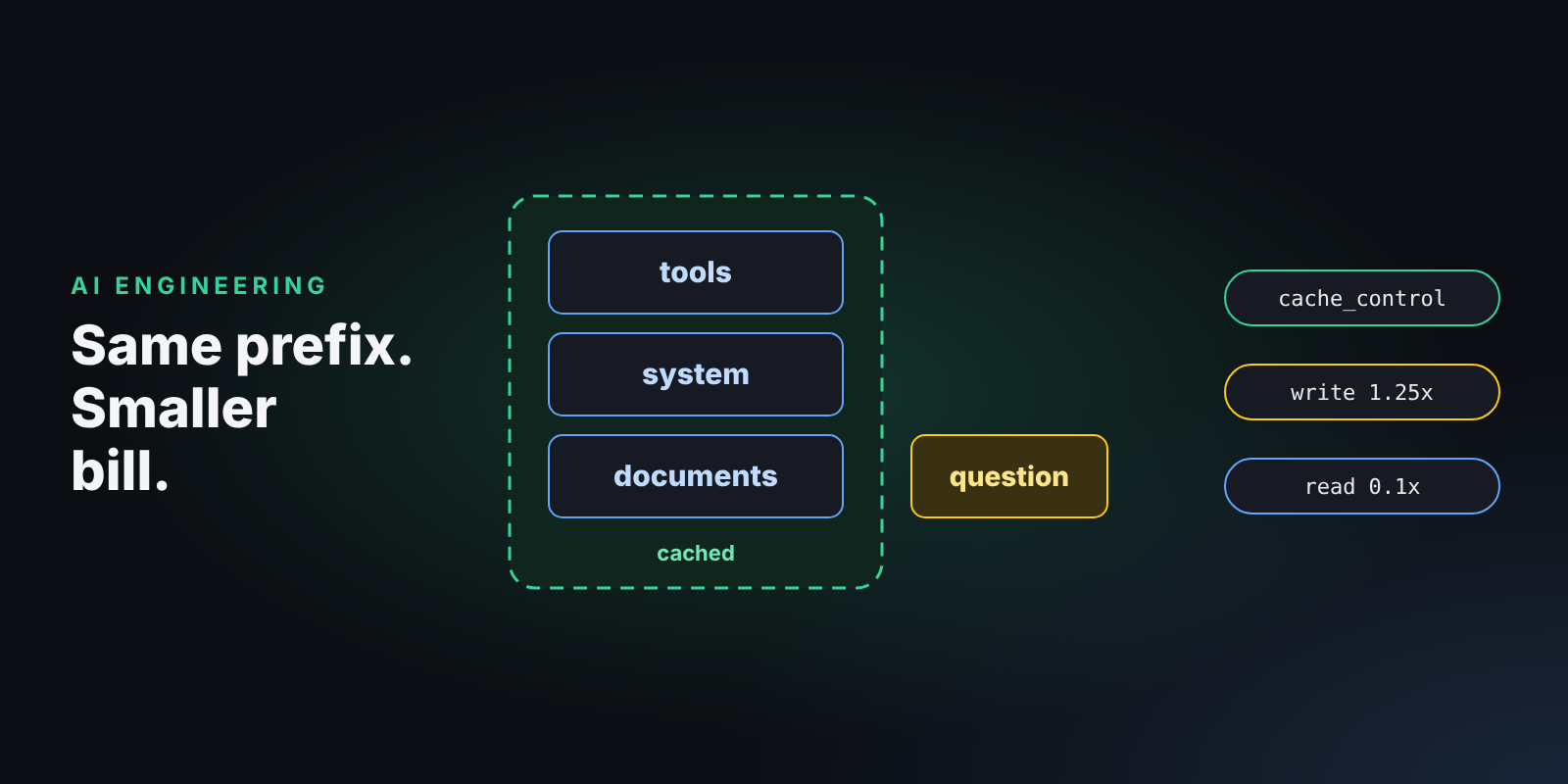
Prompt Caching for LLM Apps: Why the Order of Your Prompt Decides the Bill
How provider prompt caches match on an exact prefix, what cache writes and reads cost, how to choose a cache lifetime, and the small mistakes that silently turn caching off, with runnable models of each.
An agent loop sends the model the same tool definitions, the same system prompt and the same reference documents on every turn, and only the last few hundred tokens are new. Without caching you pay full price to have those 20,000 identical tokens processed again on every request. Prompt caching lets the provider keep the processed form of that repeated start of the prompt and reuse it, so later requests are cheaper and usually faster.
The catch is that the cache is strict. It matches on an exact prefix, and a single changed character near the top of the prompt quietly turns it off. This post explains how the match works, what it costs, how to choose a cache lifetime, and the common mistakes, with small runnable models you can play with. Vendor details come from the Anthropic prompt caching docs and the OpenAI prompt caching guide, as read in October 2026; pricing details change, so check them before you budget.
What prompt caching is, and what it is not
Short answer: the provider caches the work it did on the start of your prompt and reuses it when a later request starts with exactly the same tokens. The model still generates a fresh answer every time.
That makes it different from two things it is often confused with:
- Response caching (sometimes called semantic caching) stores the answer and returns it for the same or a similar question without calling the model. It is something you build in your own app, and it can return stale or wrong answers if two questions only look alike.
- Context compression or summarisation shrinks the prompt. Prompt caching does not change the prompt at all; the model sees exactly what you sent.
A prefix here means "everything from the start of the prompt up to some point". A cache hit means a request found a stored prefix it could reuse; a cache miss means it did not and the provider processed everything from scratch.
The rule that matters: an exact prefix, in order
Short answer: the cache key is everything before the cache point, in the order the provider assembles it. Change any byte in there and the whole key changes.
The Anthropic docs state the order explicitly: caching "references the entire prompt: tools, system, and messages (in that order), up to and including the block designated with cache_control". OpenAI's guide says the same in its own words: "Cache reuse requires the entire rendered prefix to match," and it recommends you "put stable developer instructions and shared reference material first."
So the design rule is simple: stable content first, changing content last. Tool definitions and the system prompt rarely change; the current time, the user's name, retrieved search results and the question itself change on every call and belong at the end.
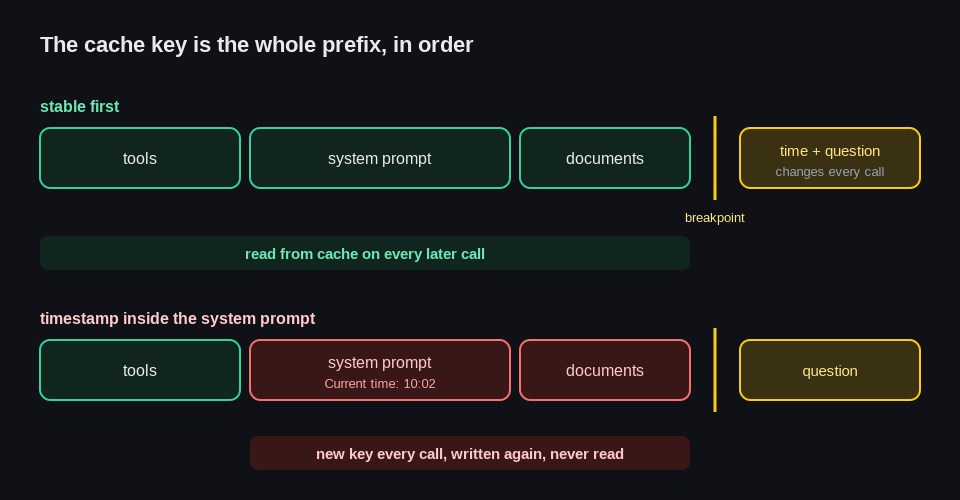 Two prompt layouts: with stable content first the prefix is read from cache on every call, while a timestamp inside the system prompt makes a new key every call
The model below is a toy, not a real provider: it treats everything up to the breakpoint as the cache key, which is the behaviour the docs describe. The two prompts carry the same information. The only difference is where the current time goes:
Output:
time in system prompt, request 1: read 0, write 15000, uncached 200
time in system prompt, request 2: read 0, write 15000, uncached 200
time in system prompt, request 3: read 0, write 15000, uncached 200
time in system prompt: 0 tokens served from cache

time in user message, request 1: read 0, write 15000, uncached 210
time in user message, request 2: read 15000, write 0, uncached 210
time in user message, request 3: read 15000, write 0, uncached 210
time in user message: 30000 tokens served from cache
Putting a clock inside the system prompt costs the whole cache: every request writes 15,000 tokens and nothing is ever read back. Moving the same line into the user message keeps the expensive part identical, so requests 2 and 3 read it from cache.
What it costs
Short answer: on Anthropic, writing to the cache costs a bit more than a normal input token, and reading from it costs a small fraction. One reuse is enough to come out ahead with the default lifetime.
From the Anthropic pricing section, relative to the model's normal input price:
| Token type | Price multiplier |
|---|---|
| Cache write, 5-minute lifetime | 1.25x |
| Cache write, 1-hour lifetime | 2x |
| Cache read | 0.1x (the docs list lower read prices for some newer models) |
| Tokens after the last cache point | 1x |
Output tokens are not affected. The calculator below uses those multipliers on a 20,000-token shared prefix with 500 new tokens per request. Costs are in "base token units", where one unit is the price of one normal input token, so it works for any model's price:
Output:
requests | no cache | 5-min cache | 1-hour cache
       1 |    20500 |       25500 |        40500
       2 |    41000 |       28000 |        43000
       3 |    61500 |       30500 |        45500
      10 |   205000 |       48000 |        63000
      50 |  1025000 |      148000 |       163000

50 requests with a 5-min cache cost 85.6% less than no cache
Three things to read from that table:
- A single request costs more with caching, because you pay the write premium and never use it. Caching only pays off for prefixes that repeat.
- With the 5-minute lifetime, two requests already break even (25,500 + 2,500 = 28,000 against 41,000). With the 1-hour lifetime you need three (the 2x write is expensive), which matches the break-even points the Anthropic docs give.
- At volume the saving approaches the read discount. Fifty requests cost about 86% less here. The more of each prompt sits in the shared prefix, the closer you get to the full 90%.
Latency also improves on a hit, because the provider skips re-processing the cached tokens, but how much depends on the provider and the prompt size, so measure it rather than assume a number.
OpenAI works differently: caching is automatic for supported models, there is no write premium, and you see the cached part in usage.input_tokens_details.cached_tokens. The minimum prompt length, lifetime and discount depend on the model, so read the current guide for the model you use.
Choosing the cache lifetime
Short answer: choose by the gap between requests that share a prefix. If they come less than 5 minutes apart, the default lifetime stays warm on its own. Pay for the 1-hour lifetime only when the gaps are longer than that.
The TTL (time to live) is how long an unused cache entry survives. Anthropic's default is 5 minutes, and the docs add an important detail: "The cache is refreshed for no additional cost each time the cached content is used." Every read resets the timer. So a busy chatbot or a fast agent loop keeps a 5-minute entry alive for as long as traffic keeps coming.
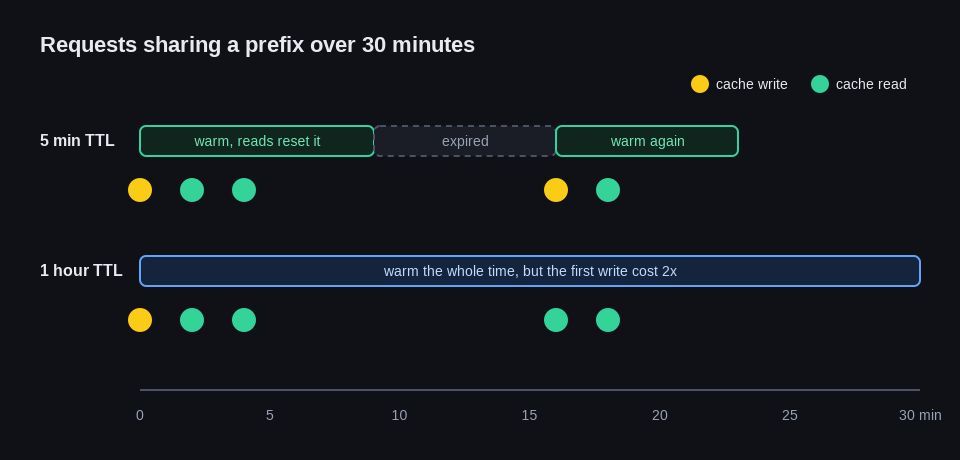 Requests at minutes 0, 2 and 4 keep a 5-minute cache warm; after a 12-minute gap it has expired and must be written again, while a 1-hour cache stays warm throughout
The 1-hour option ("ttl": "1h") exists for traffic with longer pauses: a user who answers after 20 minutes, or a background job that runs a few times an hour. Because its write costs 2x instead of 1.25x, it only wins when it saves you at least one extra write. The docs also note that the lifetime counts from the start of the request that wrote or read the entry, so a slow 4-minute generation leaves little of a 5-minute window for the next call.
The silent cache killers
Short answer: anything that makes the prefix bytes differ between calls. The request still works, so nothing tells you except the usage numbers.
These are the usual causes, roughly in order of how often they show up:
- Timestamps, request IDs or random values in the system prompt. Move them after the cache point.
- Per-user data near the top. A greeting with the user's name in the system prompt gives every user their own cache. Put user-specific context in the first user message instead.
- Tool lists that change. Tools come first in the order, so adding, removing or reordering a tool invalidates everything after it. Build the tool list in a fixed order.
- JSON with unstable key order. The same data serialised in a different key order is different text. This happens when objects are built from different code paths, such as a cache and a database:
Output:
{"plan":"pro","region":"eu","seats":12}
{"seats":12,"plan":"pro","region":"eu"}
same text: false
{"plan":"pro","region":"eu","seats":12}
{"plan":"pro","region":"eu","seats":12}
same text: true
- Prompts that are too short. Each provider has a minimum cacheable length that depends on the model. Below it, nothing is cached and there is no error. Check your provider's table for the model you use.
- Different models or workspaces. Caches are per model, and Anthropic's docs describe them as isolated per workspace or organisation, so splitting the same traffic across models or workspaces splits the cache too.
Turning it on with the Anthropic SDK
In the Anthropic API you mark the end of the stable part with cache_control. Everything up to and including that block becomes the cache key, and up to 4 such breakpoints are allowed per request. The response's usage tells you what happened:
import Anthropic from "@anthropic-ai/sdk";

const client = new Anthropic();

const SYSTEM_PROMPT = "You are the support agent for Acme. Policies: ...";

export async function answer(question: string) {
  const response = await client.messages.create({
    model: "claude-opus-5-5",
    max_tokens: 2000,
    system: [
      {
        type: "text",
        text: SYSTEM_PROMPT, // stable: no dates, no IDs, no per-user data
        cache_control: { type: "ephemeral" }, // breakpoint: cache everything up to here
      },
    ],
    messages: [
      // volatile parts go after the breakpoint
      { role: "user", content: `Today is ${new Date().toDateString()}.\n\n${question}` },
    ],
  });

  const u = response.usage;
  console.log({
    written: u.cache_creation_input_tokens, // paid at the cache-write rate
    read: u.cache_read_input_tokens,        // paid at the cache-read rate
    uncached: u.input_tokens,               // tokens after the last breakpoint
  });
  return response;
}
This was type-checked against @anthropic-ai/sdk 1.3.0 with tsc --strict, but not sent to the API, so no real usage numbers are shown. On the first call you should see the prefix under written; on a repeat within the lifetime, the same number under read.
The SDK also supports a top-level cache_control on the request, which places the breakpoint on the last cacheable block automatically. That is convenient for a growing conversation. For a prompt that ends in unique content (retrieved documents, the one-off question), an explicit breakpoint at the end of the shared part is better, because an automatic one would land after the unique tail and you would pay the write premium on text that is never reused.
Measure the hit rate
Log the three usage numbers for every request and compute:
hit rate = cache_read_input_tokens
           / (cache_read_input_tokens + cache_creation_input_tokens + input_tokens)
A healthy agent loop or chatbot with a large fixed prefix should spend most of its input tokens on reads. Two patterns tell you something is wrong:
cache_creation_input_tokensis high on every request and reads stay near zero. Something in the prefix changes each time. Diff two consecutive prompts byte by byte.- Both are zero. The prefix is below the model's minimum, or the breakpoint is missing.
Questions interviewers ask about prompt caching
Does a cache hit change the answer? No. The model sees exactly the same prompt and generates a new answer. Only the cost and the time to process the input change. If you need the same answer back, that is response caching, which you build yourself.
Why not put the user's question first, since it matters most? Because the cache matches from the start. Anything that changes per request should come last, after the stable instructions and documents, or nothing after it can be reused.
When is caching not worth it? When prompts are short, when the shared part is small compared to the unique part, or when requests sharing a prefix are rare. A prefix used once costs more with an explicit cache write than without one.
How would you cache a RAG pipeline? Keep the system prompt and tool definitions as the cached prefix, and put the retrieved chunks and the question after the breakpoint, since they change every time. If many users ask about the same large document, that document can go into the cached prefix too.
How do you know it is working in production? From the usage fields, not from the bill weeks later. Track the hit rate per route and alert when it drops, because a harmless-looking prompt change is the most common way to lose it.
Cheat sheet
| Topic | Rule of thumb |
|---|---|
| What is matched | The exact prefix, in the order tools, system, messages (Anthropic) |
| Where changing data goes | After the last cache point: time, IDs, user data, retrieved text, the question |
| Anthropic prices | Write 1.25x (5 min) or 2x (1 hour), read 0.1x or less, per the docs |
| Break-even | 2 requests with the 5-minute lifetime, 3 with the 1-hour lifetime |
| Lifetime choice | Under 5 minutes between requests: default. 5 to 60 minutes: 1 hour |
| Breakpoints | Up to 4 per request on Anthropic |
| OpenAI | Automatic for supported models; check cached_tokens in usage |
| How to verify | cache_read_input_tokens above zero on repeated prefixes |
| Usual bug | A timestamp, ID or unsorted JSON near the top of the prompt |
Enjoyed this read?
More from Arvind Nishad
- Postgres Composite Indexes: Column Order, Covering Indexes and Skip Scan, Measured on 5 Million Rows
- Cumulative Layout Shift (CLS), Measured: 15 Test Pages That Show What Moves the Score
- Vector Search for RAG: Exact, HNSW and IVF Measured on a Million Vectors
- TypeScript Interview Follow-Up Questions, Answered With TypeScript 7
Related stories
Vector Search for RAG: Exact, HNSW and IVF Measured on a Million Vectors
How vector indexes trade accuracy for speed, measured with Faiss on up to a million 384-dimension vectors. Covers recall@k, the efSearch and nprobe knobs, why recall drops as data grows, and why filtering can silently return 1 result out of 10.
Offset vs Cursor Pagination: Why Page 25,000 Is Slow and How Keyset Pagination Fixes It
Why LIMIT/OFFSET gets slower the deeper you page and shows duplicates when data changes, how keyset (cursor) pagination avoids both, and how to build a cursor API, with PostgreSQL plans and runnable examples.
Is Your RAG Retriever Any Good? Measuring It with Recall@k, MRR and nDCG
A RAG app can only answer from what its retriever finds. Learn how to build a small labelled eval set and score your retriever with recall@k, MRR and nDCG, with runnable code for each metric and the mistakes that make the numbers lie.
Responses (0)
Sign in to join the discussion.